
How to get into crypto mining in 2026?
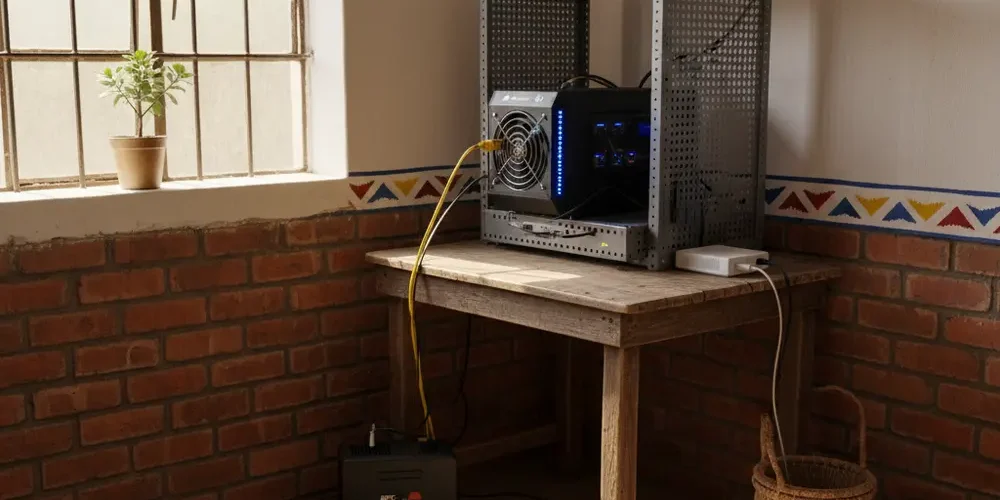
The fastest way to fail at crypto mining in 2026 is to buy a miner first and only then discover your power and internet are not stable enough to keep it hashing. That failure mode matters because downtime, overheating, and restarts do not just reduce earnings, they also shorten hardware life and create safety risks.
By the end of this article you will be able to choose a sensible first machine category, map the minimum viable network and power stack, and bring a miner online with a clear checklist. You will also know what to measure, what to log, and what to ask an electrician or ISP before you scale.
Note for South Africa:
- Design for unexpected outages, and assume power restoration can be rough on electronics unless you plan for it.
- Prioritise fibre plus Ethernet where possible, and keep your ONT and router on a small UPS so your miner reconnects cleanly.
- For any DB work, high-current circuits, or surge devices at the distribution board, use a qualified electrician and keep it compliant.
What getting into crypto mining means in 2026, Bitcoin vs other coins, home vs small farm
Mining is not one thing, it is an operations problem wrapped around specialised hardware. In 2026 most people who say mining are talking about joining a pool and contributing hash power in exchange for small, frequent payouts.
Bitcoin mining is dominated by ASIC miners, purpose-built machines that only do one job very efficiently. GPU mining still exists for some networks, but you should treat it as a different business with different risks, including coin selection, software tuning, and usually higher operational complexity.
Home mining usually means one to a few machines, a noise and heat plan, and tight control over power safety. A small farm operator is more like a micro data centre, you are designing airflow, circuits, monitoring, and predictable routines.
Before you think about profitability, define your goal in plain language. Are you learning with the smallest acceptable risk, are you converting surplus power into exposure to an asset, or are you trying to run a reliable operation that can be expanded?
If you’re new
- Start with one machine category and one pool, avoid stacking complexity early.
- Assume you will spend time on ventilation, dust control, and basic networking.
- Plan for restarts, and design a safe shutdown procedure before the first plug-in.
- Keep a simple logbook from day one, even if you are small.
If you already run rigs
- Measure your real uptime and stale share rate, then decide if internet or power is your biggest limiter.
- Standardise worker naming, firmware update routines, and alerting across devices.
- Review surge protection wear and replacement intervals as part of maintenance.
- Do not scale circuits or DB changes without professional sign-off and documentation.
Mining hardware choices, ASIC miners for Bitcoin, and when GPUs still make sense
Your first decision is less about brand and more about category. For Bitcoin, ASICs are the normal path because GPUs are not competitive for SHA-256 mining.
For a beginner small farm operator, ASICs can be simpler operationally. You typically configure network, pool URL, and monitoring, then focus on heat removal and power quality.
GPUs can make sense if your goal is flexibility or you already have suitable hardware. They usually require more tuning, more software maintenance, and they can encourage constant switching, which is not always aligned with stable operations.
If you want to browse what device categories look like and how they are grouped, use the site’s mining catalogue as a starting point at the shop. From there, narrow down by your constraints, not by the biggest hashrate number.
| Choice | What it is good for | What usually trips beginners |
|---|---|---|
| Bitcoin ASIC (pool mining) | Efficient, predictable once stable | Noise, heat, circuit limits, and restarts after outages |
| GPU rig (altcoin focused) | Flexibility, repurposable hardware | Tuning, driver issues, more moving parts, and higher management load |
| Small number of identical machines | Simplifies spares, firmware, monitoring | Single point of failure if your power and airflow design is weak |
| Mixed fleet of used devices | Potentially cheaper entry | Unknown history, uneven efficiency, harder troubleshooting |
New vs used miners, warranty risk, noise, heat, and sourcing locally in South Africa
New hardware usually reduces uncertainty, especially for power supplies and fans. Used hardware can be sensible if you can test it properly, understand the prior operating environment, and accept that early failure risk is higher.
Noise is often the hidden deal-breaker. Many miners are comparable to industrial fans, so you need an honest plan for neighbours, indoor hearing comfort, and where the exhaust air goes.
Heat is the other constraint that grows faster than you think. A single miner can turn a small room into a hot box, and if it recirculates its own hot air it will throttle, error, or crash.
If you are upgrading from a mixed DIY setup, consider standardising by selling older IT gear and simplifying. The sell your items page is useful if you want to clear hardware that is not aligned with mining or monitoring needs.
Power planning for South Africa, circuits, load shedding, surges, and backup options
Your miner does not care about your spreadsheet, it cares about clean power and consistent cooling. In South Africa you should design for interruptions, brownouts, and the moment when power returns and everything in the building tries to start at once.
Start with circuits and compliance, not adapters. Confirm what your circuit can safely deliver, what else is on that circuit, and whether your plugs, cabling, and protection are rated for continuous load.
At small farm scale, you want dedicated circuits, clear labeling, and a single place where you can shut down safely. If you are not sure, that uncertainty is a signal to involve a qualified electrician.
Load shedding and local outages change the risk profile, especially on restoration. The Electrical Contractors Association discusses how load shedding can stress equipment and why layered protection matters, see ECA guidance on load shedding and surge protection.
Minimum power protection stack, surge protection, UPS for router, and safe shutdown plan
Think in layers. You are protecting the miner, the network gear that keeps it connected, and the process that brings everything back cleanly.
- At the plug: a quality surge protector for sensitive electronics, and replace it if it has taken hits or is past its service life.
- At the DB (optional but common in small farms): professionally installed surge protection devices can protect multiple circuits, but this must be done compliantly.
- UPS for connectivity: keep your fibre ONT and router alive, not the ASIC itself. A small UPS can bridge outages and prevent constant reconnect storms.
- Safe shutdown plan: if an outage is longer than your UPS can cover, your goal is controlled power down of network and any management PC, and clean restart after power stabilises.
For practical behaviour during power events, it can be as simple as not powering everything immediately when electricity returns. MyBroadband summarises consumer-focused steps like unplugging and staggering power-up, see how to protect electronics during load shedding.
If you are running any kind of inverter or backup system, treat it as part of your mining infrastructure, not a household afterthought. If you need help assessing inverter reliability or repair options, see professional inverter repairs.
Internet and networking basics, why stability matters more than speed
Miners do not need huge bandwidth, they need consistent connectivity. Your actual enemy is packet loss, random WiFi drops, unstable DNS, and routers that crash under heat or poor power.
When the miner loses its connection, it stops submitting shares, or it submits late. That can show up as stale shares or reduced effective hashrate at the pool.
For a small farm operator, you are building a network appliance, not a home WiFi experience. Keep it boring, wired where possible, and easy to diagnose.
Ethernet vs WiFi, latency, stale shares, and how to place miners on a network
Ethernet is usually the default recommendation for miners because it is deterministic. WiFi can work, but it adds a layer you cannot always see, interference, roaming, and power-saving behaviour in consumer gear.
If you must use WiFi, treat it as a temporary bridge and monitor it closely. Place the access point to avoid metal shelving, hot exhaust paths, and long distances through walls.
- Use Ethernet for miners: run cables, add a small switch, and keep links at a stable speed.
- Separate networks: put miners on a guest network, VLAN, or dedicated router segment so household devices do not interfere.
- Monitor metrics: watch stale share rate, disconnect counts, and pool-side reported hashrate, not just local hashrate.
- Power your network gear cleanly: a UPS for ONT and router matters more than a faster WiFi standard.
If you are planning a larger layout with longer cable runs, airflow ducting, or you want a sanity check on network placement, ask for a practical review via contact us.
Pools, protocols, and software, how miners actually talk to pools
Most beginners start with pool mining because it smooths income variability. The miner connects to a pool endpoint, receives work, and submits proofs of work as shares.
You will typically configure a pool URL, a worker name, and payout details. Your ongoing job is to keep the miner connected, cool, and powered reliably.
It helps to understand that the protocol connection is a long-lived session. If your network drops repeatedly, you are repeatedly negotiating sessions, losing work time, and increasing the chance of misconfiguration or partial failures.
Stratum v1 vs Stratum V2 basics, what to look for in pool and firmware support
Stratum is the family of protocols that miners use to communicate with pools. Stratum V2 is specified as the successor to Stratum v1 and introduces more modern protocol design choices.
For an authoritative overview of how Stratum V2 connections are structured, see the Stratum V2 protocol overview. If you want deeper technical context, the canonical repository is the Stratum V2 specification repository.
In practical terms, what you should look for in 2026 is simple. Does your chosen pool support the protocol and security features you want, does your miner firmware support it, and is the setup stable in your environment?
Do not treat protocol choice as a magic profitability button. Treat it as part of reliability, security, and long-term maintainability.
Compliance and recordkeeping in South Africa, what SARS expects you to track
Mining creates receipts, expenses, and asset movements that you should be able to explain. Even at small scale, a basic recordkeeping habit reduces stress later.
SARS has clear public guidance that crypto assets are taxed under normal tax rules, and outcomes depend on facts and intent. Start with the official SARS crypto assets tax guidance and consider professional advice for your specific situation.
SARS has also publicly highlighted compliance focus regarding crypto assets, which is relevant if you are running a business-like operation. Read the SARS warning on crypto asset compliance to understand the tone and expectation of disclosure.
What to track is straightforward. Log your kWh usage, uptime, pool payouts, pool fees, repair costs, and major hardware purchases, and keep supporting invoices where possible.
A realistic starter plan for a small farm operator, budget categories, timeline, and first week checklist
Instead of asking what the best miner is, ask what your first stable lane is. A good starter plan is a machine you can cool, a circuit you can trust, and a network that stays up through small disruptions.
Budget in categories, not a single number. Hardware is only one line item, you also have electrical work, ventilation, network gear, power protection, monitoring, and ongoing maintenance.
If you want to focus your shopping on the right category, browse dedicated pages like Bitcoin ASIC miners and compare them against your power and noise constraints. If your plan includes other PoW coins, you can also look at categories like Litecoin and Doge ASIC miners, but do not mix fleets until you can operate one reliably.
First Week Mining Setup Checklist
- Site readiness: choose a location with a clear hot-air exit path, plan for noise, and keep the miner off carpets and away from moisture.
- Ventilation: prevent recirculation, ensure intake air is cooler than exhaust air, and keep the intake away from dusty floor level where possible.
- Physical security: lock the room or cage the rack, and keep cables tidy to reduce accidental unplugging.
- Power assessment: confirm dedicated circuit capacity, plug type, and continuous-load suitability, involve an electrician for any uncertainty.
- Surge protection: add a quality plug-in surge protector, and consider DB-level surge protection via a qualified installer if you are scaling.
- UPS for network: put the fibre ONT and router on a UPS, test that the internet stays up during an outage.
- Network: run Ethernet to the miner, reserve a DHCP lease or set a static IP, and disable unnecessary router features that add instability.
- Bring-up: update miner firmware if needed, set pool URL and worker name, and verify the pool dashboard shows your worker online.
- Monitoring: set alerts for temperature, hash drop, and disconnects, and check stale share rate daily for the first week.
- Ops log: record kWh readings, uptime, payouts, and any manual interventions, keep invoices and serial numbers in one folder.
Common mistakes that waste money and time
- Buying the miner before confirming circuit capacity, ventilation, and where the hot air will go.
- Running miners on WiFi without monitoring disconnects and stale shares.
- Trying to keep an ASIC running on a UPS during load shedding, instead of keeping the network up and planning controlled restarts.
- Ignoring dust and airflow until fans fail or temperatures spike.
- Scaling with mixed used hardware without standardising firmware, spares, and worker naming.
What to do next, keep it boring and measurable
If you want the simplest next step, pick one hardware category and design the environment around it. Then buy only what your power and cooling can support continuously, not what looks best on a spec sheet.
When you are ready to source hardware and the basics around it, use the shop to shortlist miners and supporting components, then cross-check each option against your circuit, noise plan, and ventilation path.
If you want help thinking through placement, ducting, or power protection layers for your specific building, send your room size, photos, and power details via contact us. You will get better results by fixing airflow and power planning early than by swapping miners later.
Frequently asked questions
How do I stop hot air from recirculating back into the miner?
Create a clear separation between intake and exhaust, and give the exhaust a direct path out of the room. If the room keeps heating up, you are likely exhausting into the same air volume you are trying to breathe from.
Where should I vent the exhaust air in a suburban home?
Vent to an area that will not blow hot air at neighbours, pets, or into your own roof space where it can build up. Avoid venting into ceilings or closed garages without a real exit path, because it often comes straight back as hotter intake air.
What duct size should I use for a single miner?
Start by matching the miner’s fan outlets and avoiding sharp bends or long duct runs that add backpressure. If you are unsure, share photos and measurements via the support channel so you do not end up choking airflow.
What should I do when load shedding starts and stops?
Let the UPS keep your ONT and router alive, and allow the miner to power down when mains fails, unless you have a properly designed backup supply. When power returns, wait for stability, then bring devices up in a controlled order, network first, then miner.
Do dust filters help or hurt?
Filters can reduce dust buildup, but they also restrict airflow if they are too fine or not maintained. If you use filters, use the least restrictive option you can, and clean or replace them on a schedule.
- Choose category first: ASIC for Bitcoin, GPU only if you want flexibility and accept extra management.
- Design for SA power reality: layered surge protection, clean restarts, and compliance for any DB work.
- Prefer Ethernet: stability beats speed, monitor stale shares and disconnects.
- Operate like a small facility: ventilation, noise plan, physical security, and monitoring from day one.
- Log everything: kWh, uptime, payouts, costs, and invoices for SARS-ready records.
This is educational content, not financial advice.

