
Small-Room Mining Cable Safety
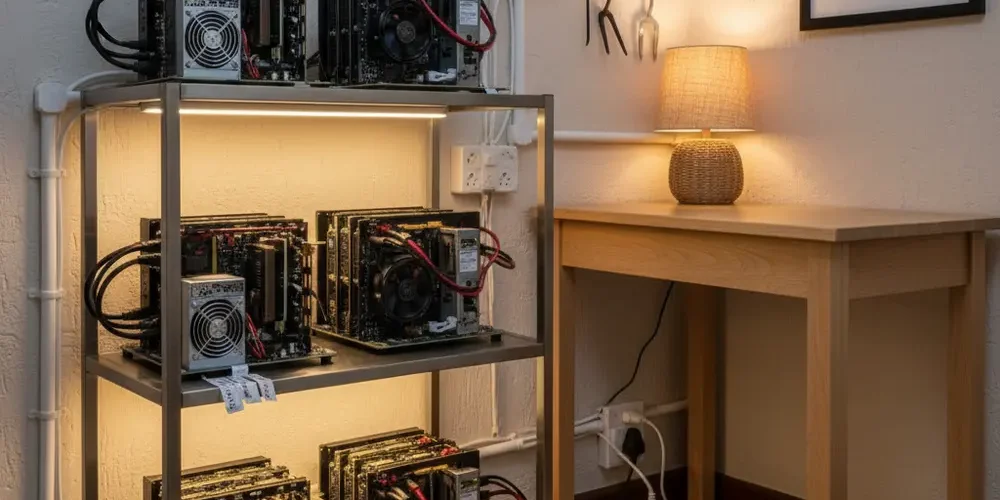
The most common small-room mining failure mode is overheated plugs, sockets, or multi-plugs caused by continuous high load and messy cabling. When it fails, it can trip breakers, damage hardware, or start a fire.
By the end of this guide you will be able to plan your power draw, choose safer cables and power distribution, and route everything to reduce heat and strain. You will also have a quick audit checklist you can run monthly, plus clear points where an electrician should step in.
Note for South Africa:
- Assume 230 V single-phase in many homes, but confirm your actual breaker sizes and circuit layout at the DB board.
- Use SANS 10142-1 as the wiring-code reference point, but treat any third-party excerpts as indicative and confirm with the official standard or a qualified electrician.
- Load shedding and power returns add surge and restart stress, plan for controlled restart and do not rely on cheap, unverified multi-plugs.
At a glance:
- Start with power planning, then cable management, neat cables do not fix overloads.
- Stop daisy chaining, distribute load across correctly rated circuits and distribution gear.
- Choose cords for continuous load, short runs, and heat resistance, avoid thin, long extensions.
- Use a monthly touch-and-check audit, act immediately on warmth, smell, looseness, or discoloration.
Key takeaways:
- Heat at connections is a warning sign, fix the cause, do not just improve airflow.
- The first plug or strip in a chain is usually where overload heat builds up.
- In South Africa, confirm compliance and limits with a qualified electrician before you scale.
What safe cable management means for mining in a small room
Safe cable management is not about aesthetics, it is about controlling heat, strain, and failure points. Mining loads are typically continuous, which exposes weak plugs, undersized cords, and poor contact pressure quickly. In a small room the risks increase because hot air recirculates, cords get bundled, and cables are more likely to be pinched by doors or furniture.
A good small-room standard is simple, every cable run should be as short as practical, easy to inspect, and not under tension. Every connection should stay cool to the touch during steady operation. Every power path should be traceable back to a specific wall socket and breaker.
Common mistakes
- Running multiple rigs from one wall socket because the room has limited outlets.
- Daisy chaining multi-plugs or power strips, which concentrates load and heat at the first strip.
- Using thin, long extension cords to reach a convenient socket, then hiding the cord under a rug.
- Bundling power leads tightly with cable ties so heat cannot escape.
- Ignoring a warm plug because the miner still runs, warmth often comes before melting.
If you’re new
- Start with one rig and learn how your room behaves, heat, noise, and breaker stability.
- Label each plug and socket pair so you know what trips what.
- Buy fewer, better-rated power accessories, not more cheap adapters.
- Keep cables visible, not buried behind curtains, rugs, or boxes.
If you already run rigs
- Do a shutdown inspection, then restart one rig at a time to spot the hot connection.
- Stop using any strip that has discoloration, loose sockets, or a burnt smell.
- Split loads across circuits before adding any new miners.
- Move from improvising with extensions to a planned distribution layout.
Power first, cable management second, how to avoid overloads
Before you buy cable trunking or nicer power strips, you need a realistic load plan. Overloads usually happen because a mining setup grows over time, while the wall socket and circuit capacity does not. Neat cabling can hide a problem until the first hot summer day.
Two practical rules help. First, treat every plug, strip, and cord as a possible bottleneck, not just the breaker. Second, plan for load shedding returns, many devices can restart at once and add extra stress to connections.
Work out your total load and circuit headroom (and what you must confirm in SA)
List every device that will run continuously, miners, PSUs, fans, router, and any AC or dehumidifier in the same room. Use the device nameplate, manual, or PSU rating label as a starting point, then measure at the wall with a quality plug-in meter where possible. If you do not have measurements, stay conservative and do not run close to theoretical maximums.
In South Africa, most general-purpose wall sockets are commonly 16 A rated, but the circuit behind them can vary, especially in older flats and houses. SANS 10142-1 includes requirements around socket-outlet circuits and anticipated load, but you should confirm the practical limit for your specific circuit with an electrician who can check conductor sizes, breaker ratings, and installation condition. A third-party hosted excerpt of SANS 10142-1 is not a substitute for the official document and a site inspection.
Use this simple workflow and write it down.
- Identify which wall sockets are on which breaker at the DB board.
- Confirm breaker rating and whether earth leakage protection is present where required.
- Assign each miner or PSU group to a specific breaker, not just a socket.
- Leave headroom for ambient heat, dust buildup, and power events.
Multi-plugs, power strips, and why daisy-chaining is a common failure point
Daisy chaining means plugging one power strip into another strip, or into an extension cord, then loading it heavily. The danger is that the first strip and plug closest to the wall outlet can end up carrying the entire downstream load, heating up at the contacts. Government and institutional safety guidance consistently flags daisy chains as a fire risk and as a sign of insufficient permanent outlets for the load.
If you need more outlets, the safer approach is to add capacity correctly, either by distributing load across multiple wall sockets that are on different circuits, or by having an electrician add a dedicated circuit and suitable outlets for the mining corner. If you are buying distribution accessories, use reputable suppliers and avoid unmarked devices, you can browse vetted accessories via our shop and compare ratings before you plug anything in.
| Choice | Why people do it | Main risk | Better option |
|---|---|---|---|
| Daisy chained power strips | Quick extra sockets | Overload heat at first strip | Add outlets or split circuits |
| Long thin extension cord | Reaches a far socket | Voltage drop, cord heating | Shorter, heavier cord |
| Tight cable bundles | Looks neat | Heat cannot dissipate | Loose routing, velcro |
| Adapters for mismatched plugs | Makes it fit | Poor contact, arcing risk | Correct plug and socket type |
For a clear explanation of why daisy chains are dangerous, see this safety note on power strips and dangerous daisy chains. Another practical overview is published by a safety office at Extension cords and power strips safety.
Choosing the right cables and connectors for continuous high load
Mining is not like charging a laptop, it is a long-duration, high-draw workload. The parts that fail are often boring, plugs, sockets, IEC leads, and extension cords. Your goal is to keep every connection cool, tight, and correctly rated.
Choose accessories that are clearly rated, well-built, and appropriate for the environment. If a product has no meaningful markings, no proper strain relief, or feels loose, do not use it for mining loads. If you are unsure what to buy for your room layout, use our contact page to ask about safer distribution options before you scale.
Extension cords, flexible cords, and why cable thickness and heat matter
Flexible cords have ampacity limits and those limits depend on construction and conditions, not just what a seller claims. Two conditions that often get ignored in small rooms are ambient temperature and bundling, both increase conductor temperature for the same current. If you coil an extension cord, bury it behind a rig, or strap multiple cords tightly together, you reduce heat shedding and raise risk.
Instead of guessing at exact conductor sizes in a blog post, use a rule you can apply without inventing numbers, keep extension cords as short as practical, select cords with robust insulation and reputable certification markings, and avoid running them under carpets or through door gaps. When you must run multiple cords together, spread them out and let air move between them. For background on how ampacity and derating are treated in code discussions, ECMWeb has a useful overview of allowable ampacity for flexible cords and a broader piece on flexible cord requirements.
- Prefer fewer, shorter cords: Each extra connection is another heat point.
- Avoid coiling: Coiled cords trap heat, especially under load.
- Keep plugs accessible: You should be able to touch-check them safely.
- Use strain relief: Prevent weight pulling on the plug pins.
Routing and fastening, avoiding pinch points, heat, and abrasion
Once your power plan is sane, routing is where you prevent damage and keep inspection easy. In a small room, most cable failures come from friction, tight bends, and accidental tension. Heat makes the insulation softer, which makes mechanical damage worse over time.
Start by deciding where hot air exits your rigs, then keep cabling out of those exhaust streams. Leave a clear service loop so you can unplug a miner without yanking a lead. Finally, separate power cables from sharp metal edges on shelves or frames.
Cable ties, velcro, trunking, grommets, and how to avoid hotspots
Use cable ties sparingly and never compress a bundle so tight that the outer insulation deforms. Velcro straps are usually better for mining because you can re-route without cutting and you can keep bundles loose. If you use trunking, do not pack it full, crowded trunking traps heat and makes faults harder to spot.
Where a cable passes through a shelf, cabinet, or wall, add a grommet or a protective edge. Avoid running cables through doorways where they will be pinched. If your only option is a doorway, change the plan, it is not worth the repeated stress.
- Keep power and data separate: It reduces tangles and makes troubleshooting faster.
- Use gentle bends: Tight bends can stress conductor strands and plug terminations.
- Keep off the floor where possible: Floors collect dust and moisture, and get stepped on.
- Label both ends: A simple label saves you from unplugging the wrong rig.
Wall-load profile differs by unit. The Avalon Q 90T draws materially less than a 3.8 kW S21 family unit, which is usually the difference between staying inside a residential 16A circuit and tripping the main breaker.
Load shedding realities, surge protection, earthing, and safe restart behavior
Load shedding changes the risk profile of home mining. You have repeated power loss, power returns that may not be clean, and equipment that may all try to restart at once. That combination increases stress on PSUs, power strips, and the first plug in the chain.
Plan for two moments, the cut and the return. At the cut, aim for an orderly stop if possible, especially if you are on an inverter or UPS that you do not want to drain. At the return, aim for staged restarts, so you do not slam every PSU on at the same time.
- Surge and protection: Use quality surge protection where appropriate, but do not assume it makes unsafe loading safe.
- Earthing matters: A proper earth path and functioning earth leakage device reduce shock risk, confirm with an electrician.
- Restart staging: Bring rigs back in a sequence, one group at a time, watch for warm plugs or nuisance trips.
- Log trips: If a breaker trips, treat it as a signal to investigate, not as an annoyance.
Heat management also ties into cable safety, a hotter room makes every connection run hotter. Energy Star discusses operational thinking around inlet temperature and hotspots, which is useful even for a small mining room, see server inlet temperature guidance. ASHRAE also publishes environmental envelope guidance for IT equipment, which helps you focus on equipment inlet air rather than only room averages, see data center environmental classes.
Quick safety audit and when to call an electrician (SA context)
The goal of an audit is to catch small warning signs before they become melted plugs or smoke. A mining setup changes often, one new PSU, one new fan, one extra extension, and the risk profile shifts. Run this audit monthly, and again any time you add gear or after a suspicious trip.
If you want a safer path to expansion, consider using professional services for planning, especially if you need a dedicated circuit, better airflow, or inverter integration. If you are unsure whether your socket type and installation match modern expectations, a local overview of SANS 164 context can help you ask better questions, see South African plug and socket compliance notes.
Printable small-room mining cable safety audit
- 1) Circuit and DB checks
- Identify the breaker feeding your mining sockets and label it.
- Confirm breaker rating and whether earth leakage protection is present and functioning where required.
- Do you have a dedicated circuit for mining, yes or no, if no, note what else shares it.
- 2) Socket and plug condition
- Check for heat marks, discoloration, looseness, or crackling sounds.
- Confirm plugs fit firmly and do not sag under cable weight.
- Any burnt smell, stop and investigate immediately.
- 3) No daisy chaining and correct power strip use
- No power strip plugged into another strip or extension for permanent use.
- Power strip rating is readable and appropriate for the intended load.
- Wall socket is not overloaded with multiple adapters.
- 4) Cable selection
- Cords are as short as practical and not coiled during operation.
- No cuts, crushed sections, exposed copper, or taped repairs.
- Cable jackets are not soft or sticky from heat.
- 5) Cable routing
- No rugs, no door pinch points, no sharp edges without grommets.
- Cables are kept clear of miner exhaust and hot PSU vents.
- Strain relief is used so plugs are not taking mechanical load.
- 6) Surge and power event plan
- Surge protection approach is documented, and devices are not overloaded.
- Shutdown approach is clear for load shedding or inverter changeover.
- Restart plan is staged, not everything at once.
- 7) Monitoring
- Room and intake temperatures are monitored, and hotspots are addressed.
- Do a careful touch-check of plugs and strips after 30 to 60 minutes at steady load.
- Record any trip events and what was running at the time.
- Electrician sign-off date: _________
Call an electrician if any of these are true.
- You cannot confidently map which sockets are on which breakers.
- A wall socket is loose, hot, discoloured, or intermittently loses contact.
- You need more outlets and you are tempted to add another strip instead of adding capacity.
- Your DB board has signs of heat, burning smell, or repeated nuisance trips.
- You are integrating an inverter, generator, or complex changeover and want it compliant and insurable.
If your next step is sourcing better distribution gear, replacement leads, or safer mounting accessories, start with the Sellyourpc shop. If you want help planning a safer layout for your specific room dimensions, airflow, and load shedding behaviour, use Sellyourpc contact and include photos of your DB board label, sockets, and current cable routes.
Frequently asked questions
Is it safe to run a mining rig from a normal 16 A wall socket?
It can be safe if the load is within the practical capacity of the circuit, the wiring and socket are in good condition, and you are not relying on daisy chained strips or thin extensions. In South Africa, confirm your breaker rating, conductor sizing, and installation condition at the DB board and with a qualified electrician for code-critical decisions.
Why do plugs and multi-plugs get hot even when the breaker does not trip?
Breakers protect against overcurrent, but heat at plugs often comes from poor contact, worn springs inside a socket, loose terminations, or concentrated load through a small contact area. Heat can build up below the trip threshold, especially under continuous mining load, treat warmth as a warning.
Can I use an extension cord permanently for my mining corner?
Extension cords are generally intended for temporary use, and they add resistance and extra connection points. If you must use one, keep it short, uncoiled, visible, and appropriately rated, and plan to move to a proper outlet or dedicated circuit as soon as practical.
What should I do after load shedding when power returns?
Bring your setup back in stages. Start one rig or one PSU group at a time, check for any unusual fan noise, smell, or warm plugs, then proceed. If you see nuisance trips or a plug getting warmer than usual, stop and investigate instead of repeatedly resetting the breaker.
Do surge protectors solve mining safety problems?
Surge protection can help with certain transient events, but it does not fix overloads, poor cabling, or loose sockets. Treat it as one layer in a broader plan that includes proper earthing, correct circuit capacity, and safe cable routing.
Short summary
- Start by mapping circuits and planning load, then tidy cables.
- Remove daisy chains and reduce extension use, shorten and strengthen the power path.
- Route cables to avoid heat, pinch points, and tight bundles.
- Plan for load shedding returns with staged restarts and regular inspections.
This is educational content, not financial advice.

