
Corporate Laptop Refresh Checklist
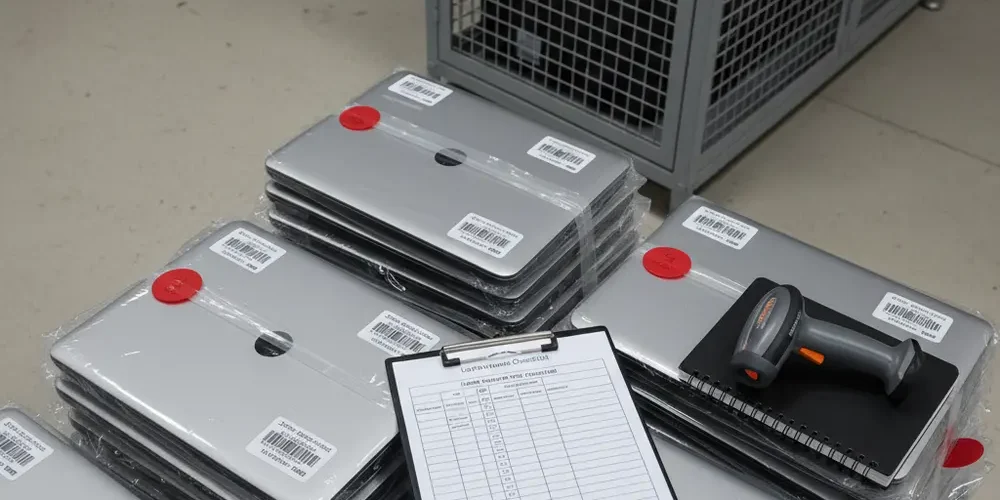
A corporate laptop refresh is not only a procurement project, it is also a controlled exit of data from your environment. If you do not make decommissioning repeatable and auditable, you create avoidable risk and messy exceptions.
By the end of this article you will have a step-by-step IT asset decommissioning checklist you can run across sites, vendors, and models. You will also have an evidence pack structure that makes internal audit, POPIA conversations, and downstream resale or recycling far easier.
Note for South Africa:
- POPIA expectations typically push you toward provable deletion or destruction, not informal "we reimaged it" assumptions.
- E-waste handling is regulated and increasingly formalised, plan for compliant collection, transport, and recycling routes rather than ad hoc disposal.
- Multi-branch rollouts increase transport and storage risk, design chain-of-custody controls for handovers, sealed storage, and courier legs.
At a glance:
- Define scope, roles, and the baseline sanitisation standard you will follow.
- Build a decision matrix for Clear, Purge, or Destroy based on disposition and threat model.
- Run a repeatable intake-to-disposition checklist with serial capture, chain of custody, wipe, verification, and sign-off.
- Produce an evidence pack per batch, including tool output, operator details, approvals, and final disposition.
Key takeaways:
- Sanitisation is a process with records, not a single technical action.
- Modern laptops need offboarding steps for MDM, BitLocker keys, TPM, and cloud enrollment before any wipe.
- Your recycler or ITAD partner must fit into your chain of custody, not replace it.
Scope and roles for a laptop refresh decommissioning runbook
Start by drawing a hard boundary between refresh build tasks and decommission tasks. Your runbook should cover devices from the moment they leave the user until they are redeployed, sold, donated, or recycled. If you manage multiple sites, standardise one runbook and allow site-specific appendices.
Define roles early, because most audit findings are role confusion. Assign an owner who is accountable for the end-to-end process, not only the wipe station. Also define who can approve destruction, who can release devices to third parties, and who signs the final evidence pack.
- Process owner, accountable for policy alignment and reporting.
- Custodian, responsible for physical control, storage, and handovers.
- Sanitisation operator, runs approved tools and records outputs.
- Reviewer, verifies records, sampling results, and exceptions.
- Approver, authorises disposition routes like resale, donation, or destruction.
If your organisation is ISO-aligned, map your runbook to the "secure disposal or re-use" control language and embed it in your ISMS evidence flow using an ISO 27001 Annex A 7.14 explainer ISO 27001 secure disposal or reuse control.
Pre-decommission planning and evidence pack (what to decide before touching devices)
Before a single laptop is collected, decide what "done" means for your environment. Choose the baseline sanitisation guidance you will follow, define Clear, Purge, and Destroy in your own policy terms, and align that to the risk of the data and the disposition route using NIST SP 800-88 NIST SP 800-88 media sanitisation guidelines.
Next, decide what evidence you will retain, and for how long, based on internal audit expectations and your retention schedule. Do not guess your sector rules in a blog checklist, instead point to your governance owner and record the policy reference in the evidence pack. If you need a practical benchmark for what fields appear in sanitisation certificates, a vendor mapping can help you shape your own template without adopting the tool, see fields commonly captured in sanitisation records sanitisation record requirements.
Evidence pack minimum contents should be defined as a template, then auto-filled where possible.
- Batch ID, site, dates, and named roles for that batch.
- Device identifiers, asset tag, serial number, and storage type noted.
- Sanitisation method selected per device, including Clear, Purge, or Destroy category.
- Tool name and version, operator ID, start and end times, and outputs.
- Verification approach, per-device verification or defined sampling, plus results.
- Exception log with reason codes, for example failed drive, cannot boot, MDM lock.
- Disposition decision and handover record, including third-party details if used.
Early decision table, match method to disposition
Use a short decision table so teams stop debating at the wipe bench. Treat this as a starting point, then adapt it to your threat model and contractual requirements.
| Disposition route | Typical risk posture | Recommended category | Evidence focus |
|---|---|---|---|
| Internal redeploy | Known org control | Clear or Purge | Operator log plus verification |
| Resale via ITAD | Leaves org boundary | Purge preferred | Certificate and serial list |
| Donation | Low control after handover | Purge or Destroy | Verification and approvals |
| Parts harvest | Component-level exposure | Destroy for storage | Destruction witness record |
| Certified recycling | End of life | Destroy or Purge | Chain of custody and recycler proof |
Step-by-step IT asset decommissioning checklist (laptops)
This is the core "printable" checklist. Run it in phases, and do not allow later phases to start until earlier sign-offs are complete. If you need a managed handover or on-site execution, align the phases to your service approach on our corporate IT asset disposal page corporate IT asset disposal.
Phase 1, intake, inventory, and chain-of-custody controls
- Create a batch ID and register the collection event, site, date, and collector name.
- Capture device identifiers, asset tag, serial number, and model, and photograph labels only if your policy allows it.
- Record current status, boots yes or no, BIOS password unknown, physical damage, missing charger.
- Place each laptop into a controlled container, for example a numbered tote, tamper-evident bag, or sealed crate, and record seal numbers.
- Move devices to a locked staging area with an access log and a maximum holding time.
- Log each custody handover, including courier legs, with signatures, timestamps, and counts.
Phase 2, access and offboarding (accounts, MDM, encryption)
- Confirm the device is assigned to the correct user and business unit in your asset system.
- Confirm cloud identity and device management status, for example MDM enrollment, Autopilot registration, or other provisioning services, and plan deprovisioning.
- Confirm full-disk encryption status, for example BitLocker, and ensure you can escrow or retrieve keys where required by policy.
- Disable or remove device from management only when you have documented approval and recorded the device identifiers.
- Collect chargers and peripherals if they are part of your resale or redeploy policy, and record completeness.
For Windows device lifecycle tips and related operational notes, keep a reference hub in your internal KB and link to your public insights area for staff education Sell Your PC Insights.
Phase 3, choose sanitisation method, Clear, Purge, Destroy
Select the method per device using an approved decision prompt. NIST SP 800-88 defines Clear, Purge, and Destroy categories and stresses that selection is risk-based and tied to intended disposition Clear vs Purge vs Destroy definitions.
- Clear, for lower-risk reuse inside the org where you can accept less aggressive sanitisation and maintain control.
- Purge, for higher assurance, often used when devices leave organisational control or where the threat model is stronger.
- Destroy, for end-of-life or when sanitisation is not feasible, for example failed storage, unknown encryption state, or soldered storage with constraints.
Risk prompt, answer these before selecting a category.
- Will this device leave your organisation, even temporarily, during resale, repair, or recycling?
- What type of data was processed, for example customer information, credentials, regulated records, or proprietary IP?
- Is the storage removable, and can you reliably execute and verify the chosen method on this model?
- What is your acceptable evidence bar, per-device verification or documented sampling?
Phase 4, execute sanitisation (HDD vs SATA SSD vs NVMe SSD)
Do not assume one wipe tool works for every storage type. Build model-specific playbooks and maintain a compatibility list, especially for modern NVMe and soldered storage devices. Where OEM tooling exists for a fleet, document it as an approved method, for example Microsoft Surface Data Eraser for supported Surface devices Microsoft Surface Data Eraser.
- HDD, follow your approved method and verification routine, and record results per drive identifier.
- SATA SSD, prefer methods suitable for SSD characteristics, and avoid relying on repeated overwrite assumptions without policy backing.
- NVMe SSD, use approved commands or vendor tools where applicable, and record the command path used.
- Soldered storage, document feasibility early, if you cannot meet your assurance and verification bar, route to Destroy and record why.
Always record the tool output or command log in a tamper-evident way. If your process relies on crypto-erase, document prerequisites such as encryption state and key handling, and who approved crypto-erase as acceptable for that disposition route.
Phase 5, verification, logging, and certificates
Verification is where many programmes fall apart. Decide if you will do per-device verification, or per-device logs plus defined sampling, and document it as a control, not a personal preference. NIST SP 800-88 emphasises verification and record keeping as part of a defensible process verification and sampling for sanitisation.
- Verify the result in the way your policy requires, for example tool-reported verification or independent spot checks.
- Record verification status per serial, including pass, fail, or exception, and never overwrite a failure record.
- Generate a certificate of sanitisation or destruction for each batch, with the serial list attached.
- Have the reviewer sign off the batch, then lock the evidence pack to prevent edits.
Handling modern devices, SSDs, soldered storage, TPM, BitLocker, and cloud accounts
Modern endpoints are tied to identities and management platforms, and that can block resale or cause data leakage if you only wipe storage. Treat decommissioning as a joint exercise between endpoint engineering and security. If you have recurring issues, route questions to a single escalation path and keep it documented, your vendors and business units will thank you for it, and you can also reach our team for help contact us.
Minimum modern-device checks before the device leaves your control.
- Remove the device from MDM, Autopilot, or equivalent enrollment so it does not re-enroll unexpectedly.
- Confirm BitLocker and recovery key handling aligns to your policy, and that you can explain crypto-erase decisions.
- Clear BIOS or UEFI passwords per your standard, or record them as exceptions that force a different disposition route.
- Account for TPM and hardware-backed keys, and document resets that were performed.
- Check for activation locks or vendor account ties on non-Windows devices, and record removal steps.
Post-sanitisation paths, redeploy, resale, donation, parts harvest, certified recycling
Once a laptop passes sanitisation and verification, decide its next path quickly to avoid drift and rework. Every day in storage is added custody risk and operational overhead. Keep each route gated by a minimum security bar and a minimum functional bar.
- Redeploy, reimage, re-enrol, and reassign with a fresh asset record link to the old one.
- Resale, ensure the buyer channel is formal, you have a certificate and serial list, and the device is deprovisioned from management services.
- Donation, treat this as leaving your boundary, use a higher assurance category and add an approval step.
- Parts harvest, destroy or remove storage first, then process remaining components.
- Recycling, prefer certified routes with documented collection and downstream processing, and avoid informal scrap channels.
If you also handle buy-back, resale, or collection programmes, align your internal policy to what your public service pages promise, for example your professional services overview professional services.
South Africa lens, POPIA data destruction, retention rules, and e-waste obligations
In South Africa, POPIA conversations often hinge on whether you can show that personal information was deleted, destroyed, or de-identified in a way that prevents reconstruction. That is why your evidence pack matters as much as your wipe action. For a practical POPIA-aligned discussion of deletion and destruction expectations, see ASISA guidance on POPIA POPIA deletion and destruction audit trail.
Do not hardcode retention timelines into a generic checklist. Instead, add a field in your evidence pack for the policy reference used for that batch, and ensure legal or compliance has signed it off. If you need more interpretive context, a legal commentary can help frame internal discussions, see a POPIA destruction and deletion overview POPIA destruction and deletion process documentation.
On the e-waste side, plan for compliant routing and avoid landfill assumptions. Government and regulator material is a better anchor than informal industry claims, start with the DFFE electronic waste management document NEMWA electronic waste management South Africa. For broader context on South Africa’s EPR approach and programme messaging, see the government e-waste programme launch communication South Africa e-waste EPR context.
Common failure modes and audit findings, how to prevent them
Most decommissioning failures are not technical, they are process gaps that compound over time. Use this section as a pre-flight check for your next refresh wave. If you see repeated issues, treat them as design defects in the runbook and fix the template, not only the people.
Common mistakes
- Serial numbers captured late, leading to mismatched certificates and asset records.
- Devices stored in open areas while waiting for wipe, increasing custody and theft risk.
- MDM or Autopilot not deprovisioned, causing activation locks or surprise re-enrolment.
- Exceptions handled informally, for example failed drives leaving site without destruction approval.
- Verification treated as optional, or sampling done with no documented method.
If you’re new
- Start with one site and one model family, then scale after you have stable evidence packs.
- Create a single batch template and enforce it, even if it feels rigid at first.
- Use a sealed staging area and a simple handover log before you add advanced tooling.
- Decide upfront which disposition routes you will allow, and which are banned.
- Run a tabletop exercise for a lost device scenario and confirm what evidence you would need.
If you have done this before
- Review your last refresh wave for exception types, then redesign controls around the top three.
- Split duties so the operator is not also the reviewer, at least for high-risk batches.
- Standardise model-specific wipe playbooks, and retire obsolete tools and USB sticks.
- Add transport controls for multi-branch runs, including seal numbers and courier handover logs.
- Measure cycle time from collection to disposition, then shrink it to reduce custody exposure.
Frequently asked questions
Do we need to use NIST SP 800-88 in South Africa?
You do not have to use a specific international standard to be POPIA-aligned, but adopting a clear baseline like NIST SP 800-88 makes method selection, verification, and audit evidence more consistent NIST SP 800-88 media sanitisation guidelines.
Is reimaging Windows the same as data destruction?
Reimaging is an IT rebuild step, not automatically a sanitisation outcome. Your policy should define what constitutes Clear, Purge, or Destroy, and your evidence pack should prove what you actually did, per device.
What should a certificate of data destruction include?
Keep it practical, batch ID, device identifiers, date, method category, tool or destruction method, operator and reviewer names, and verification results. A good certificate is backed by logs and serial lists, not only a PDF cover page fields to capture in a certificate of sanitisation.
How do we handle laptops with failed SSDs or that won’t boot?
Do not let them drift into informal storage or untracked courier trips. Record them as exceptions, route them to an approved Destroy path for storage media where required, and retain the approval and witness records in the batch evidence pack.
When should we involve an ITAD or recycling partner?
Involve them before the refresh wave, so contractual clauses, chain-of-custody handovers, and certificate formats are agreed and tested. Your partner should fit into your controls, and you should still own the records end-to-end, if you want help scoping that, start from corporate IT asset disposal ITAD chain of custody support.
Wrap-up, what to implement next
Decommissioning is easiest when the runbook is simple, enforced, and backed by evidence. If you build your checklist around clear phases and a disciplined evidence pack, you will reduce risk and speed up refresh cycles.
- Publish a one-page runbook summary with roles, gates, and escalation contacts.
- Adopt a Clear, Purge, Destroy decision prompt, then train operators on it.
- Standardise batch evidence packs with serial capture, logs, and sign-offs.
- Harden physical custody, sealed staging, handover logs, and short cycle times.
- Align disposition routes to POPIA expectations and compliant e-waste channels.
This is educational content, not financial advice.

